• Member Login
American Psychoanalytic Association
  • About
    • About APsA
    • About Psychoanalysis
  • Membership
  • Meetings, Events & Symposia
    • Upcoming Meetings & Symposia
    • Calendar of Events
  • Professional Development
    • Psychoanalytic Education & Research
    • Continuing Education
    • Fellowships & Awards
  • Media & Publications
    • Publications
    • Psychoanalysis & You Podcast
    • News & Statements
  • Find a Clinician
  • Give
  • Search
  • Menu Menu
Automatic Dues Payments Instructions
How to Add a Payment Method to your APsA Account

and/or How to Authorize Automatic Dues Payments

LOGIN

  • Login to apsa.org (use the email address on file with the National Office)
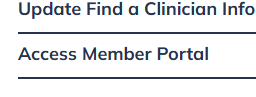
  • From the Member Dashboard page, click on ‘Access Member Portal’
  • Continue with Steps 1 & 2

STEP 1: Adding a Payment Method

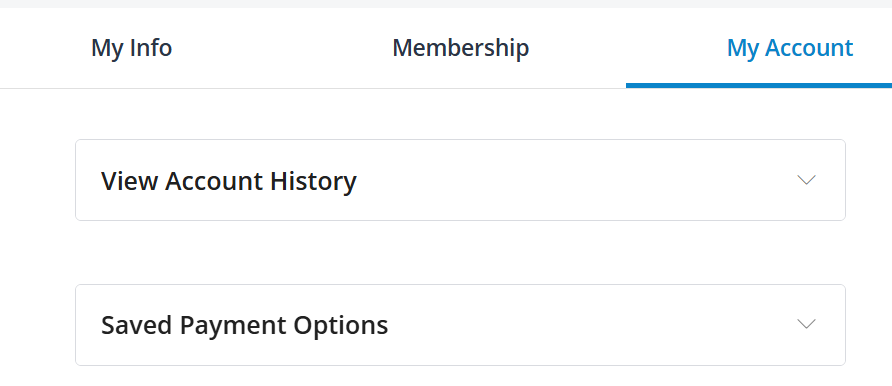
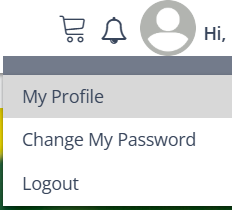
  • Access the drop-down menu by clicking on your name and choosing ‘My Profile’
  • Next click on ‘My Account’ and open ‘Saved Payment Options’

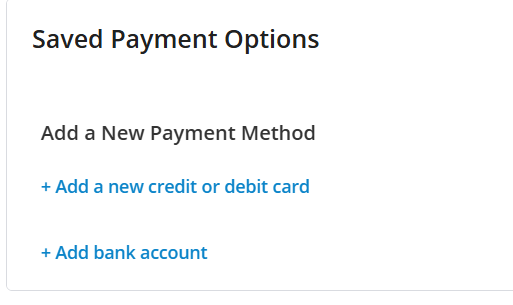
Now add a new payment method or review/change a saved one:

  • Have a Payment Method on file?

>It will show here, please double-check that the credit/debit card will not be expiring over the next 90 days and update the card if it is expiring

  • Need to Add a Payment Method?

>This is where you can Add your payment method (Make sure you click on Save)

You now have a payment method on file that is accessible for dues payments or when registering for a meeting.

Note: Saving a Payment Method does not add you to automatic dues payments – Continue with Step 2 to Opt-in to Automatic Annual Dues Payments.

STEP 2: Authorizing Automatic Dues Payments

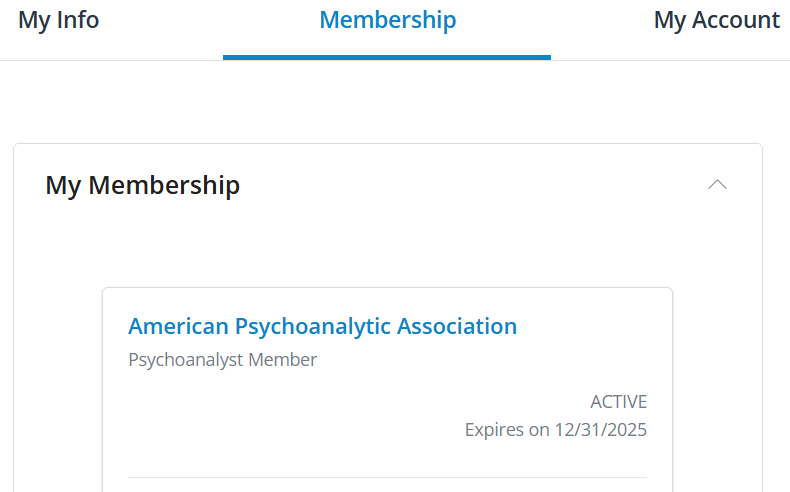
  • After you have added a payment method or checked the current one on file, click on the ‘Membership’ tab in the same section where you see ‘My Account’
  • Click on the ‘American Psychoanalytic Association’ member box
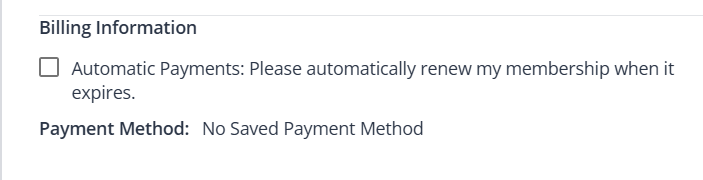
  • This brings you to a page that contains ‘Billing Information’
  • You will see your saved payment method here (if payment method is missing, please repeat Step 1 to add it and make sure you hit Save).
To Opt-In – simply click on the box allowing Automatic Dues Payments.

For a PDF of these instructions, click here.

Questions? Please contact Membership Services at [email protected]


Thank you for your annual support.

  • Donate Today
  • Gifts of Stock
  • Retirement Plan Gifts
  • Donor Advised Funds
  • Gifts of Royalties
  • Support APsA — Giving Opportunities
thumbnail

APsA Member Benefit Directory

Sorry, but you do not have permission to view this content.

https://apsa.org/wp-content/uploads/2022/08/Layer-80.png 0 0 Scott Dillon https://apsa.org/wp-content/uploads/2022/08/Layer-80.png Scott Dillon2026-04-06 12:54:202026-04-06 12:55:50APsA Member Benefit Directory
  • About APsA
  • Membership
  • Donate
  • Store
  • Find a Clinician
  • Contact Us

© 2009-2026 American Psychoanalytic Association | 122 East 42nd Street, Suite 2310, New York, NY 10168 | Phone: (212) 752-0450 | [email protected]

  • Link to Facebook
  • Link to LinkedIn
  • Link to Instagram
  • Link to Youtube
Scroll to top